Creating Simple Calculator CLI app using Golang with TDD approach
"Go is an open-source programming language that makes it easy to build simple, reliable, and efficient software" as advertised by Google on their official website. It is an excellent choice to develop reliable APIs, microservices, CLI apps, etc. I've played recently with Golang for some automation work as a CLI app. Before Golang my choice would have been a shell/bash script or maybe javascript. This time I tried something with Golang because of its big community, efficiency, package support, and most importantly its easiness of Testing. Golang has good support for developing CLI apps along with that it helps developers to test their code with ease which makes it an excellent choice for developing CLI apps. In this blog, we will develop a simple CLI app using the Golang testing package with TDD approach.
What are we going to build? 🤔
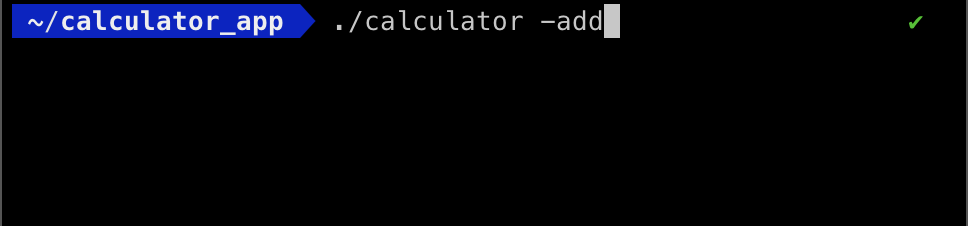
We are going to build a Calculator application with basic operation of "addition", "subtraction", "multiplication", "division". We will build the code and generate an executable file that will run on all platforms. We will execute that file with the flag of -add, -subtract, -multiply, and -div. Refer to the diagram below you will get some idea.
Let's start developing 👷
- First of all, let's create a folder named
calculator_app(or whatever you want to name) where we are going to add our code and module. - Navigate to that folder and run this command
go mod init calculator_app. This will generate a filego.mod. [ About .mod file:.modrefers to themodule. It is a kind of dependency management and it is created at the root of the project directory. It has dependency requirements of the modules that have been used. For a simple analogy, it is similar topackage.jsonin javascript.] - Now create a file
calculator.gowhere we will have all of our code related to our calculator logic. - Let's add the following code in the
calculator.go.
   package main

   import (
      "fmt"
   )

   func main() {
      fmt.Println("Calculator app")
   }
- We have some structure with some basic print message code which is self-explanatory.
- We will execute it by running
go run calcuator.goin the root of the directory and you can see the messageCalculator appon the screen. - But our application wasn't about printing some random message. It was about developing a calculator API with the TDD approach.
Let's TDD!!
- As I said earlier Golang has support for testing the code there is no need to install any external package or library.
To initiate testing, we will create a file
calculator_test.goin the root of the directory and add the following code.package main import ( "testing" ) func TestAdd(t *testing.T) { exp := 5 res := addition(2, 3) if res != exp { t.Errorf("%d was expect but got %d .\n", exp, res) } }- To do any testing in Go, you have to import the "testing" package.
- After that, we have the function
TestAddwith pointer reference totestingas the parameter. - As the name suggests this function will be about testing the
Addfunction (which does not exist yet). - One more thing to note, the function name starts with
Test... So, every testing function should initiate with theTestkeyword. - So, we have assigned
expvariable with value5andreswithaddition(2,3)(this is referring toadditionfunction). if res != expchecks if the expected value and result are the same or not.- If they are not the same we will throw some errors.
- So far, it's easy and self-explanatory.
- Now, let's run the code to see the test result by running
go test -vand you will see the following errors in the console.

- As you can see in the console
undefined: additionmeans that functionadditionis not implemented yet. - So, let's add
additionfunction inmain.go.func addition(a int, b int) int { return a + b } - Now, run again
go test -v. Hurray!! our test pass and you will see something like below in your terminal.
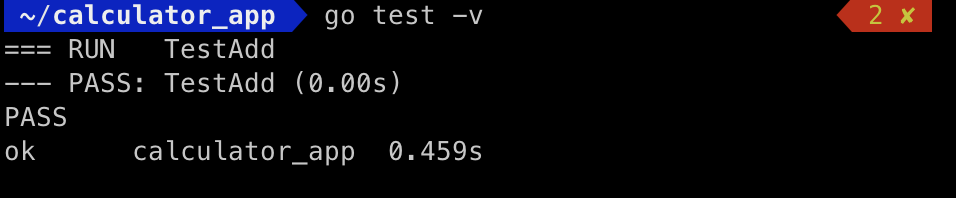
We have added the test for addition and implemented the function later. Similarly, we will add tests for other functions as follows.
func TestSubtract(t *testing.T) { exp := 2 res := subtract(5, 3) if res != exp { t.Errorf("%d was expect but got %d .\n", exp, res) } } func TestMultiply(t *testing.T) { exp := 10 res := multiply(2, 5) if res != exp { t.Errorf("%d was expect but got %d .\n", exp, res) } } func TestDivision(t *testing.T) { exp := 2 res := division(6, 3) if res != exp { t.Errorf("%d was expect but got %d .\n", exp, res) } }Similarly, add the functions of the above functions in
calculator.goas followsfunc subtract(a int, b int) int { return a - b } func multiply(a int, b int) int { return a * b } func division(a int, b int) int { return a / b }- Run the test again to check and everything passes.
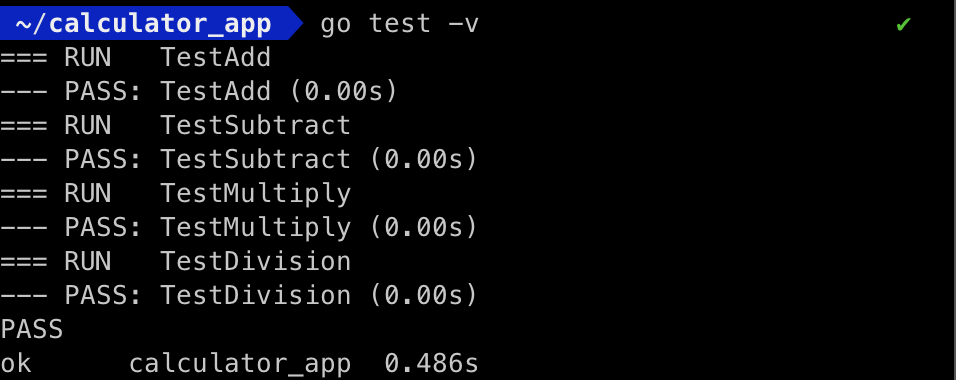
Adding Flags:
- So far, we have developed the API layer of the application. Now, we will add a flag to ask our app to do the specific operations.
- For example, on running, users can specify
-add,-subetc flag to do the specific operation. - Golang provides a
flagpackage to input flag from user at runtime. - Add the following code in your
calculator.gofilemainfunction.
func main() {
add := flag.Bool("add", false, "Add two numbers")
subs := flag.Bool("subtract", false, "Subtract two numbers")
mult := flag.Bool("multiply", false, "Multiply two numbers")
div := flag.Bool("divide", false, "Divide two numbers")
flag.Parse()
flagpackage hasBoolfunction which takesflag3 parameters (flag-name, default value, description).flag.Parse()is to parse the command line into the defined flags.- Our application is capable of taking flags from users. Now we want to take ask for input of two values from user. Add the following code below
flag.Parse()line.var first, second int fmt.Println("Enter 1st Number: ") fmt.Scan(&first) fmt.Println("Enter 2nd Number: ") fmt.Scan(&second) - Now, we have to call specific functions as per the flag. We will add a
switchcase for ease.switch { case *add: fmt.Printf("Additon: %d \n", addition(a, b)) case *subs: fmt.Printf("Difference: %d \n", subtract(a, b)) case *mult: fmt.Printf("Product: %d \n", multiply(a, b)) case *div: fmt.Printf("Division: %d \n", division(a, b)) default: fmt.Fprintln(os.Stderr, "Wrong option try with add, subtract, div and multply") os.Exit(1) } - Above code is very self-explanatory where we are calling the function as per the flag name.
- Except in default case the line
os.Exit(1)which means to abort the program immediately. - Our final
calcualtor.gofile looks like below.
package main
import (
"flag"
"fmt"
"os"
)
func main() {
add := flag.Bool("add", false, "Add two numbers")
subs := flag.Bool("subtract", false, "Subtract two numbers")
mult := flag.Bool("multiply", false, "Multiply two numbers")
div := flag.Bool("divide", false, "Divide two numbers")
flag.Parse()
var a, b int
fmt.Println("Enter 1st Number: ")
fmt.Scan(&a)
fmt.Println("Enter 2nd Number: ")
fmt.Scan(&b)
switch {
case *add:
fmt.Printf("Additon: %d \n", addition(a, b))
case *subs:
fmt.Printf("Difference: %d \n", subtract(a, b))
case *mult:
fmt.Printf("Product: %d \n", multiply(a, b))
case *div:
fmt.Printf("Division: %d \n", division(a, b))
default:
fmt.Fprintln(os.Stderr, "Wrong option try with add, subtract, div and multply")
os.Exit(1)
}
}
func addition(a int, b int) int {
    return a + b
}
  func subtract(a int, b int) int {
      return a - b
  }

  func multiply(a int, b int) int {
      return a * b
  }

  func division(a int, b int) int {
      return a / b
  }
Let's run and test:
- Now, that our tests are running fine. Let's test the application as a whole CLI app.
- For that go to the root directory of the project and run
go build. This will generate acalculatorfile in the directory. - For windows users you can run
GOOS=windows go build, this will generate thecalculator.exefile. - Now, you can run the file as
./calculator -add. It will ask for two numbers as inputs. Enter them and you will see the out as below.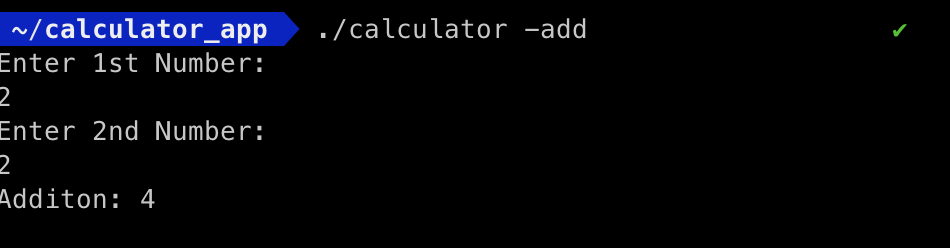
So, this is your final running calculator CLI app with some taste of testing. I hope you like this blog. I am myself exploring Golang yet, if there is any way to improve the code or if you have any questions then please comment below. Thanks for reading 😊.
References:
About the author
- I am a Software Engineer from Mumbai, India. In love with Functional programming ( precisely Elixir). Love to share the knowledge that I learn while developing things.
Comments
Join the discussionNo comments yet. Be the first to comment.