Fetching data from external Graphql API service in Phoenix LiveView

Recently while creating my personal portfolio website abulasar.dev, I added a blog page. For that, I had fetched hashnode blogs on the page. Hashnode has exposed its blog through API. You can visit api.hashnode.com and this API is in Graphql format. Previously, I had fetched these blogs in an Ember.js app and wrote a blog on this topic. I had no previous experience using graphql client in the elixir projects. I implemented it in this project and this blog will be about using graphql query in the Phoenix LiveView project. Let's build one!!
Action Plan
- Creating LiveView project
- Installing and configuring graphql client.
- Adding API layer to fetch data.
- Integrating API layer with UI
Let's start building 👷
- First of all, as discussed will create a LiveView project.
- We will confirm if Elixir is installed by running
elixir -v. - Once confirmed we need to create/generate the Phoenix LiveView application.
- This can be done by running
mix phx.new fetch_hashnode --no-ecto --liveand this will generate one. - We will then navigate to the project directory by running
cd fetch_hashnodeand runmix phx.server. Once, the project starts running navigate tolocalhost:4000to see theWelcomephoenix screen.
Installing Graphql client
- I searched for Graphql client in Elixir and came across a few but the one that caught my eye is Neuron. It is very easy to configure and use so I decided to go with
Neuron. - We will configure
Neuronby first adding it to the list of dependencies. - Open the
mix.exsfile and add Neuron to the list of dependencies.def deps do [ ........, {:neuron, "~> 5.0.0"} ] end - Now run
mix deps.getto install the dependency. - Next, we are going to configure
Neuron.
Configure Neuron
- To query Hashnode API, we have to add a
urlin the Neuron configuration. - As per documentation we can test Neuron in
iex shellby running the following query.
iex> Neuron.Config.set(url: "https://api.hashnode.com/")
- After adding this you can query Hasnode API as follows
Neuron.query("""
{
  user(username: "your_username") {
      publication {
          posts(page: 0) {
              title
              brief
              slug
              cuid
              coverImage
          }
      }
  }
}
""")
- This query will return a
Neuronresponse with a list of blogs on page number 0, along with the nitty-gritty details ofheaderresponses, something like below.
{:ok,
 %Neuron.Response{
   body: %{
     "data" => %{
       "user" => %{
         "publication" => %{
           "posts" => [
             %{ } // blog 1,
             %{ } // blog 2
           ]
    }
           ]
         }
       }
     }
   },
   headers: [
     {"Connection", "keep-alive"},
     {"Content-Length", "3186"},
     ......
   ],
   status_code: 200
 }
}
- So far so good, everything is looking fine. In our next step, we'll add an API layer where we'll place the above query to fetch the data.
Adding API layer to fetch data
- We will add a module that will have all two functions one to fetch all blogs and one to fetch specific blogs.
- Create a file a create a folder
blog_postsunderlib/fetch_hashnode. In that, we'll add theblog.exfile. Add the following code to it.
defmodule FetchHashnode.Blog do @username "your_hashnode_username" def get_blogs(page \\0) do Neuron.query(""" { user(username: "#{@username}") { publication { posts(page: #{page}) { title brief slug cuid coverImage } } } } """) end def get_detail_blog(slug) do Neuron.query(""" { post(slug: "#{slug}", hostname: "#{@username}") { title, slug, cuid, coverImage, content, contentMarkdown, tags { name } } } """) end end- The above two functions are self-explanatory. It is simple and very similar to what we have tried earlier in the console.
- Let's fire up the
iexshell by runningiex -S mix phx.serverand do some testing of these functions. - We'll first test the
get_blogsfunction which expects to return a list of all blogs on page 0 (because the default is 0). - Run the following query
iex> FetchHashnode.Blog.get_blogs - We will get the error
" you need to supply an url". So, what went wrong? 🤔 - If you'll remember we registered the
urlwith theNeuronin the shell earlier by doing something like this.Neuron.Config.set(url: "https://api.hashnode.com/") - We want
Neuronshould be aware of thisurlas soon as the server starts. So, we will add the above snippet inapplication.exin thestartfunction.
def start(_type, _args) do
    children = [
      FetchHashnode.Repo,
      ....
   ]
   opts = [strategy: :one_for_one, name: FetchHashnode.Supervisor]

   Neuron.Config.set(url: "https://api.hashnode.com/")  # This is the line
   ...
end
- Now, again restart the server
iex -S mix phx.serverand again query the functionFetchHashnode.Blog.get_blogsand voila!! it's working now. - Similarly for the second function i.e
get_detail_blogwe need to pass theslugof the blog. So, we will test the function with somesluglike this
FetchHashnode.Blog.get_detail_blog('writing-mix-task-in-elixir-phoenix')
- This will return a detailed version of the blog.
Integrating API layer with UI
- Now, that we have a working API layer. We will add a
LiveViewpage to display these fetched blogs. - Add
blogsendpoint inrouter.exby adding the following code
scope "/", FetchHashnodeWeb do
    pipe_through :browser

    live "/blogs", BlogsLive
end
Now add a file
lib/fetch_hashnode_web/live/blogs_live.exand add the followingmountcallback in the code.defmodule FetchHashnodeWeb.BlogsLive do use FetchHashnodeWeb, :live_view alias FetchHashnode.Blog def mount(_params, _session, socket) do {:ok, blogs} = Blog.get_blogs() blogs = get_in(blogs.body, ["data", "user", "publication", "posts"]) socket = assign(socket, blogs: blogs ) {:ok, socket} end end- We have aliased the
Blogmodule and queried theget_blogsfunction in the mount function. - We have assigned the fetched blogs to the
blogsvariable using pattern matching. - Later we have extracted all the blogs and assigned them to
socketthis will make it available in the view in therendercallback. - We will loop over the
blogsvariable in the view to display something like this.def render(assigns) do ~L""" <%= for blog <- @blogs do %> Title: <%= blog["title"] %> <hr> <% end %> """ end - It will look something like below
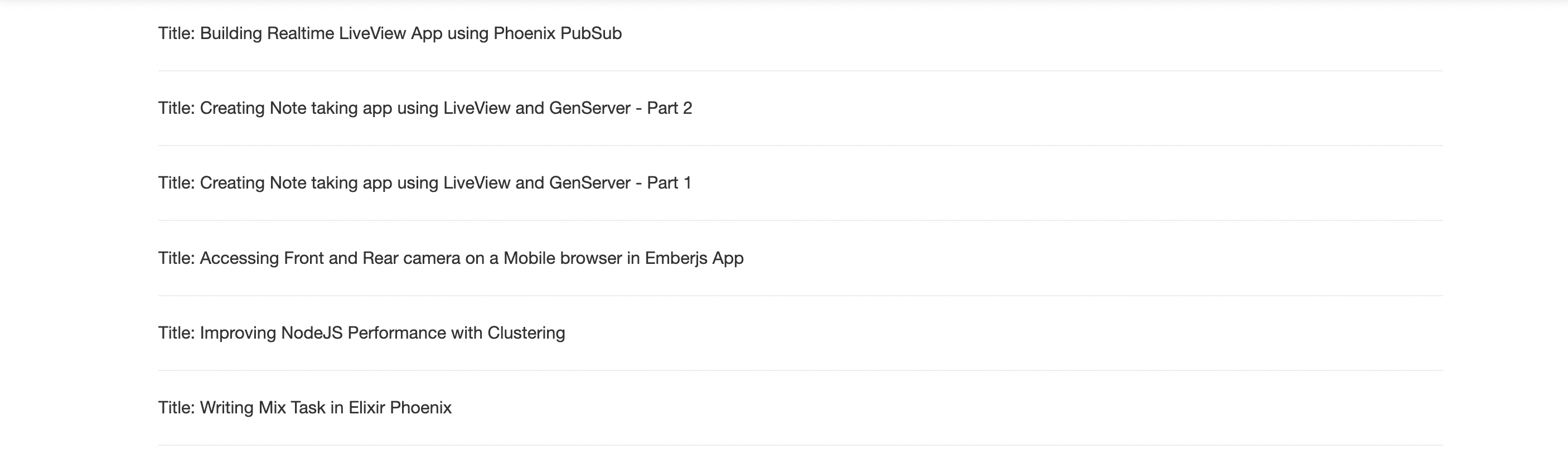
- Similarly, we can fetch a particular blog and display it on a separate
LiveViewpage. I'll leave this logic up to you 😊.
I hope you like this blog. Of course, there is some scope of refactoring that I intentionally didn't touch. If you have any questions then please comment below. Thanks for reading 😊.
References
About the author
- I am a Software Engineer from Mumbai, India. In love with Functional programming ( precisely Elixir). Love to share the knowledge that I learn while developing things.
Comments
Join the discussionNo comments yet. Be the first to comment.